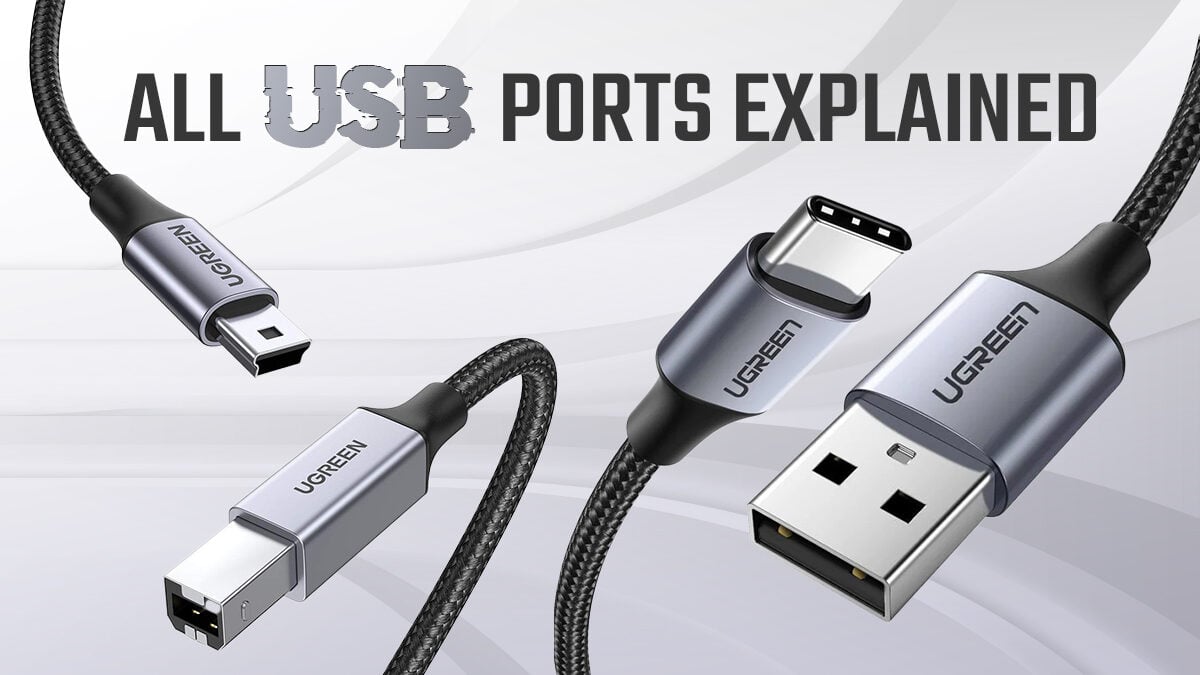
The USB landscape has been in constant evolution, and the transition from the ubiquitous Type-A port to the reversible, faster, and more versatile Type-C has been a significant one. While many new devices are embracing Type-C, a vast number of our existing peripherals, chargers, and accessories still rely on the older Type-A connector. This is where the humble USB Type-A to Type-C adapter becomes an indispensable tool. However, with a plethora of options flooding the market, selecting the *right* adapter can be a surprisingly complex task. This guide aims to demystify the process, empowering you to make an informed decision that meets your specific needs and ensures optimal performance and compatibility.
Understanding the USB Evolution: Why the Shift?
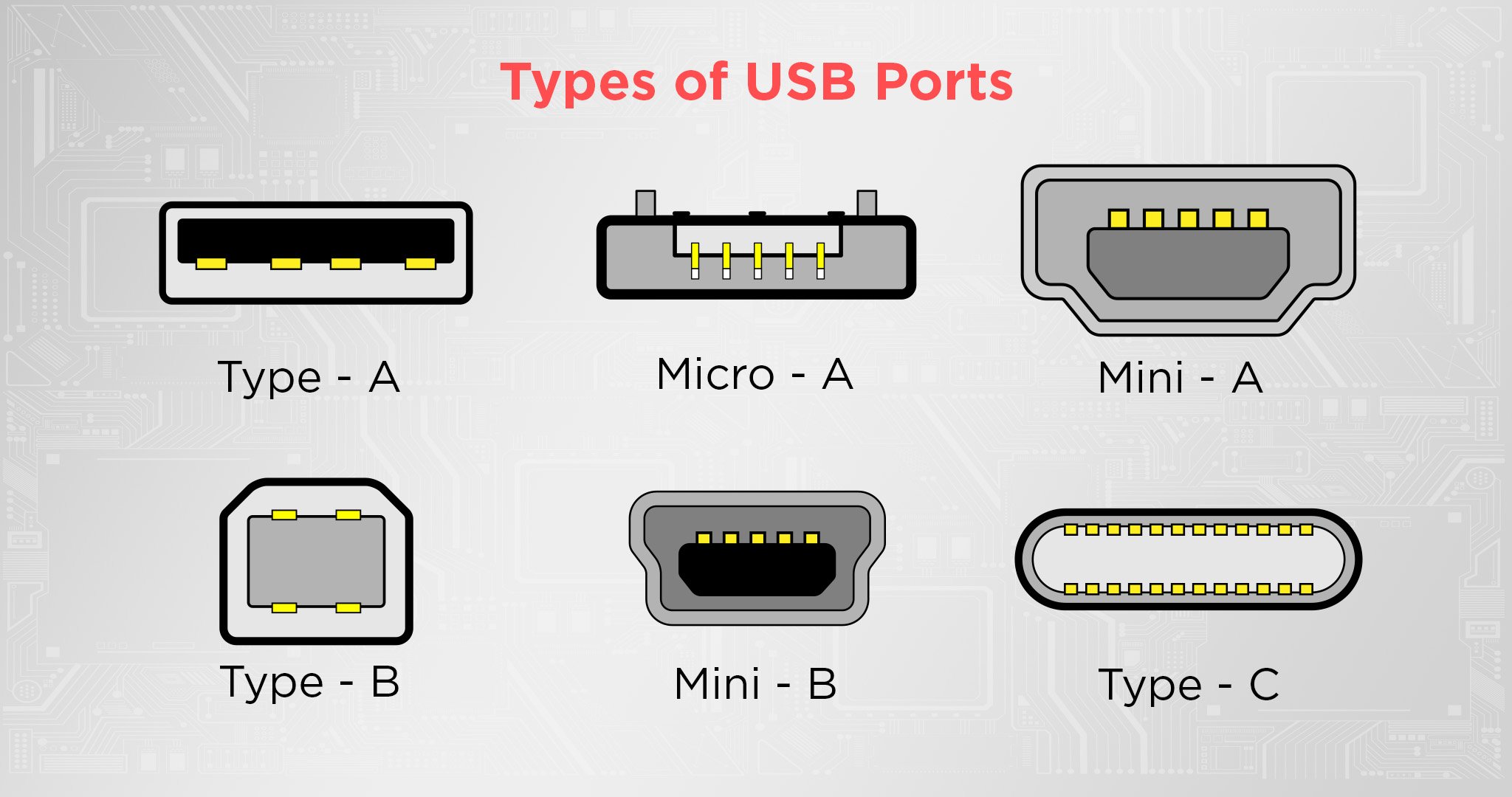
Before diving into adapter selection, it’s crucial to understand the fundamental differences between USB Type-A and Type-C. USB Type-A, the rectangular connector we’ve known for decades, has been the workhorse of data transfer and charging. However, its limitations became increasingly apparent with the demand for higher speeds, more power, and greater convenience.
USB Type-C, on the other hand, offers a multitude of advantages:
- Reversibility: No more fumbling to find the correct orientation; Type-C plugs in either way.
- Higher Data Transfer Speeds: Type-C is the physical connector that supports various USB specifications, including USB 3.0, USB 3.1, USB 3.2, and even Thunderbolt 3 and 4, offering speeds far exceeding traditional USB Type-A.
- Increased Power Delivery: USB Power Delivery (USB PD) is a feature commonly associated with Type-C, allowing for significantly faster charging of devices like laptops, tablets, and smartphones.
- Versatility: A single Type-C port can handle data transfer, video output (DisplayPort Alternate Mode), and power delivery, reducing the need for multiple ports and cables.
The statistics highlight this shift. According to Statista, by 2025, it’s estimated that over 80% of new smartphones shipped will feature a USB Type-C port. This trend extends to laptops, tablets, and other consumer electronics, making the need for seamless connectivity between older and newer standards paramount.
Decoding the Adapter: Key Features to Consider
When choosing a USB Type-A to Type-C adapter, several critical factors dictate its performance and suitability for your tasks. Overlooking these can lead to frustratingly slow speeds, compatibility issues, or even damage to your devices.
1. USB Specification: The Backbone of Performance
This is arguably the most important consideration. The adapter must support the USB specification of the devices you intend to connect. Connecting a USB 3.0 device to a USB 2.0 adapter will limit your data transfer speeds to USB 2.0 levels. Conversely, a high-spec adapter might be overkill if you’re primarily connecting older, slower devices.
- USB 2.0: Offers speeds up to 480 Mbps. Suitable for basic peripherals like keyboards, mice, and older flash drives.
- USB 3.0/3.1 Gen 1 (SuperSpeed): Offers speeds up to 5 Gbps. Ideal for external hard drives, SSDs, and faster flash drives. Often marked with a blue USB Type-A port.
- USB 3.1 Gen 2 (SuperSpeed+): Offers speeds up to 10 Gbps. Necessary for high-performance external storage and faster data transfers.
- USB 3.2: This is a branding update that encompasses the previous speeds and introduces new modes. USB 3.2 Gen 1×1 (5 Gbps), Gen 2×1 (10 Gbps), and Gen 2×2 (20 Gbps).
- Thunderbolt 3/4: While Type-C is the connector, Thunderbolt is a protocol that uses Type-C. It offers speeds up to 40 Gbps and supports PCIe, DisplayPort, and USB data simultaneously. Adapters labeled as Thunderbolt 3/4 compatible are the most versatile but also the most expensive.
Example: If you’re transferring large video files from a USB 3.0 external hard drive to a laptop with a USB Type-C port, you’ll need an adapter that supports at least USB 3.0 or higher to experience those fast transfer speeds. Using a USB 2.0 adapter would bottleneck the transfer to a glacial pace.
2. Power Delivery (PD) Capabilities: Charging Your Devices Faster
For charging devices, especially power-hungry ones like laptops, the adapter’s ability to support USB Power Delivery is crucial. Standard USB Type-A ports typically provide 5V/0.5A or 5V/0.9A. USB PD, facilitated by Type-C, can negotiate higher voltages and amperages, delivering up to 100W or even more in some advanced implementations.
When looking for a Type-A to Type-C adapter with PD capabilities, ensure it’s designed to pass through sufficient power. However, it’s important to note that a Type-A to Type-C adapter is usually limited by the power output of the Type-A source port. So, if your Type-A port on your laptop only outputs 5V/1A, the adapter, even if PD-capable, won’t magically provide more power. The real benefit comes when you’re connecting a PD-enabled Type-C charger to a Type-A port that supports higher output, or more commonly, when the adapter itself is designed to draw power from a specific PD-capable Type-A power brick and deliver it to a Type-C device. Always check the adapter’s specifications for its maximum supported wattage.
3. Build Quality and Durability: Investing in Longevity

A cheap, poorly made adapter might seem like a bargain, but it can lead to connection issues, premature wear and tear, or even damage to your ports. Look for adapters constructed with robust materials.
- Connector Material: Gold-plated connectors offer better conductivity and corrosion resistance.
- Cable Sheathing: Braided nylon or reinforced PVC jackets are more durable than standard plastic.
- Strain Relief: This is the flexible part where the cable meets the connector. Good strain relief prevents the cable from bending too sharply and breaking.
Case Study: A user reported constantly needing to wiggle their USB Type-A to Type-C cable to get a stable connection. Upon inspection, they discovered the strain relief was flimsy, and the internal wires were beginning to fray after only a few months of use. This highlights the importance of prioritizing build quality.
4. Brand Reputation and Reviews: Learning from Others
Reputable brands often invest more in quality control and customer support. Before making a purchase, take the time to read reviews from other users. Pay attention to comments regarding:
- Reliability and consistent performance
- Compatibility with specific devices
- Durability over time
- Customer service experiences
Websites like Amazon, Best Buy, and tech review sites provide a wealth of user feedback that can be invaluable.
5. Adapter Type: Variations on a Theme
While the basic function is the same, adapters come in various forms:
- Simple Plug-in Adapters: These are small, often dongle-like adapters that plug directly into your Type-A port, providing a Type-C female port. They are convenient for portability.
- Cables with Adapters: These are USB Type-A to USB Type-C cables where the Type-C end might have an integrated adapter or the entire cable is designed for this conversion.
- Hubs and Docks: For more extensive connectivity needs, USB Type-A to Type-C hubs and docks offer multiple ports, including Type-C, for a variety of peripherals.
Your choice will depend on how you intend to use the adapter. For occasional use, a simple dongle might suffice. For more permanent setups or connecting multiple devices, a hub might be a better investment.
Common Use Cases and Recommended Adapters
Let’s consider some typical scenarios and what type of adapter would be most suitable:
Connecting Older Peripherals to a New Laptop
Scenario: You have a USB 2.0 wired keyboard and mouse, and your new laptop only has USB Type-C ports.
Recommendation: A basic USB 2.0 (or higher) Type-A to Type-C adapter is perfectly adequate. Focus on build quality and a reputable brand for longevity.
Transferring Data from External Hard Drives
Scenario: You need to transfer large files from a USB 3.0 external hard drive to your new tablet with a Type-C port.
Recommendation: Opt for a USB 3.1 Gen 1 (5 Gbps) or USB 3.2 Gen 1×1 adapter. This ensures you’re not bottlenecking the speed of your hard drive.
Charging Your Phone from an Older Power Bank

Scenario: Your phone has a Type-C port, but you want to charge it using a USB Type-A power bank.
Recommendation: A USB 3.0 (or higher) Type-A to Type-C adapter is recommended if your power bank supports faster charging outputs. If your power bank is older and only supports USB 2.0 speeds, then a USB 2.0 adapter will suffice.
Connecting to a Display

Scenario: You want to connect your USB Type-C laptop to a monitor that only has USB Type-A ports (though this is less common for monitors, it might apply to some older docking stations or adapters).
Recommendation: This is where it gets tricky. Standard USB Type-A ports typically *do not* support video output protocols like DisplayPort Alternate Mode. Therefore, a simple Type-A to Type-C adapter won’t allow you to send video signals from a Type-C source *to* a Type-A output. You would likely need a Type-C to HDMI/DisplayPort adapter for the monitor itself, and then potentially a Type-A to Type-C adapter to connect a peripheral *from* the monitor *to* your laptop if the monitor has upstream Type-A ports for data. Always verify the specific capabilities of your devices.
Making the Smart Connection
The USB Type-A to Type-C adapter is a bridge between the past and the future of connectivity. By understanding the underlying USB specifications, considering power delivery needs, prioritizing build quality, and leveraging the experiences of other users, you can confidently choose an adapter that ensures seamless and efficient operation. Don’t let a subpar adapter become a bottleneck in your digital life. Invest wisely, and enjoy the full potential of your devices, regardless of their port types.